> For the complete documentation index, see [llms.txt](https://eztalks.gitbook.io/help/llms.txt). Markdown versions of documentation pages are available by appending `.md` to page URLs; this page is available as [Markdown](https://eztalks.gitbook.io/help/products/phone-numbers/how-to-set-up-sms-forwarding.md).
# How to set up SMS forwarding
Step by step to set up SMS forwarding
SMS forwarding allows you to receive and view incoming text messages for your eztalks phone numbers on your mobile phone. With this feature, you will never miss any new messages from your customers, and you can also reply by your mobile or go to eztalks to respond to your customers.
### Set up SMS forwarding
1. Sign in to eztalks and go to **the My phone numbers** page
2. Click the **Setting** icon on the left of the phone number which you want to set up the SMS forwarding.
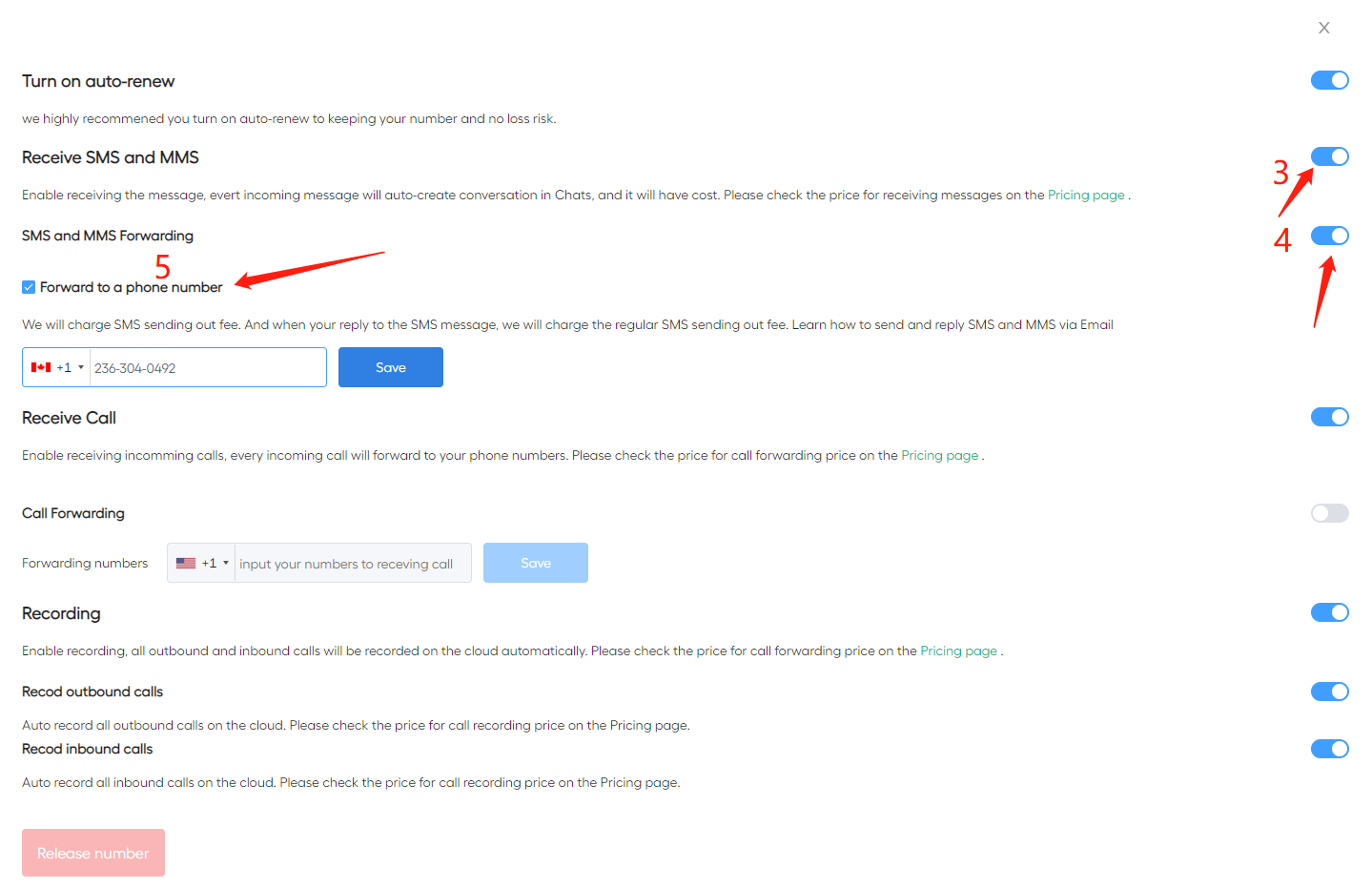
3. Enable Receive SMS and MMS.
4. Enable SMS and MMS forwarding.
5. Input your mobile number to receive the forwarded SMS and MMS, and click the **Save** button.