> For the complete documentation index, see [llms.txt](https://eztalks.gitbook.io/blog/llms.txt). Markdown versions of documentation pages are available by appending `.md` to page URLs; this page is available as [Markdown](https://eztalks.gitbook.io/blog/tech/vulnerability-scanning-vs.-pen-testing-what-you-need-for-consistent-performance-and-security.md).
# Vulnerability Scanning vs. Pen Testing: What You Need for Consistent Performance and Security
Most teams cut corners on security because they’re busy keeping things running, and security feels like a separate universe with its own vocabulary. But whether you run a site, a SaaS product, or a webinar on a cloud platform, you’ll quickly learn that [consistent performance and security](https://www.atlantic.net/) are the same goal, wearing different hats.
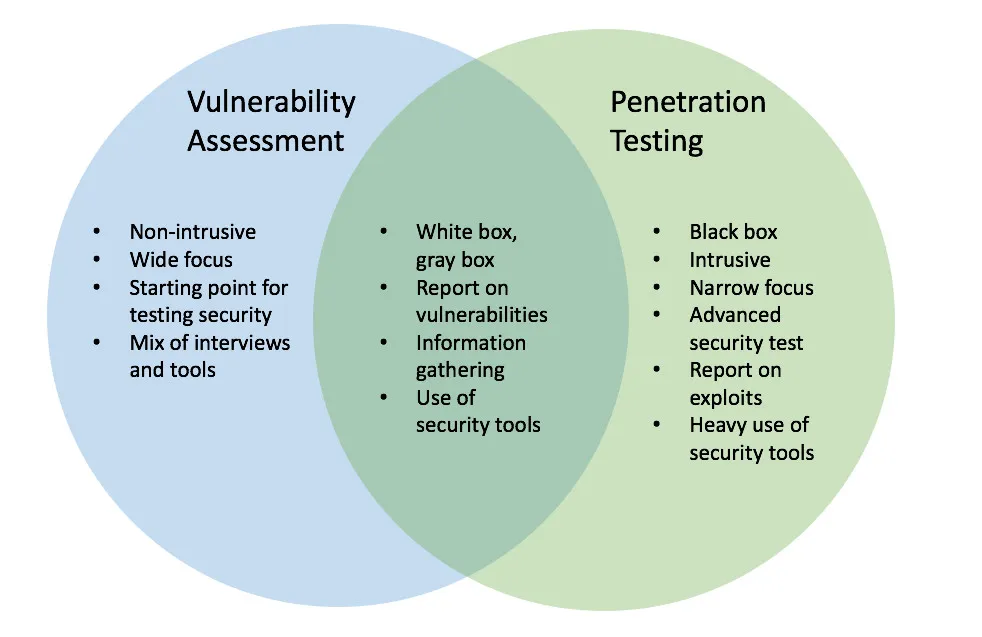
As for the question of vulnerability scanning vs. pen testing, it’s all about what you should do continuously (vulnerability scanning) and what you should delve into more deeply on occasion (pen testing).
A vulnerability scanner is like a smoke detector, always looking for familiar warning signs and alerting you when something matches a known pattern. A pen test is like hiring someone to try to break in through your windows and doors, then showing you the exact path they used.
If your server is missing a critical patch, a scanner will usually flag it quickly. If your login flow has a subtle weakness and your password reset can be abused, a scanner might not “see” it the way a human attacker would. A pen tester might.
That’s why web hosting companies and teams running web hosting services often treat scanning as routine maintenance, and pen tests as periodic pressure tests. So, most organizations need both, on different schedules, and tied to how they host and deploy.
### What vulnerability scanning is good at
Scanning works best when both the problem and the fix are clear. Say your web server is running an outdated OpenSSL package. A scanner detects the version, matches it to a known CVE, and tells you to update it.
That kind of issue shows up constantly, which is why scanning is so valuable for cloud hosting, dedicated servers, and even fully managed hosting solutions. It’s the fastest way to spot known risks across a lot of systems.
Scanning is also easier to trend over time. If you scan weekly, you can literally watch your “open findings” go down (or creep up) and manage it like a real operational workload.
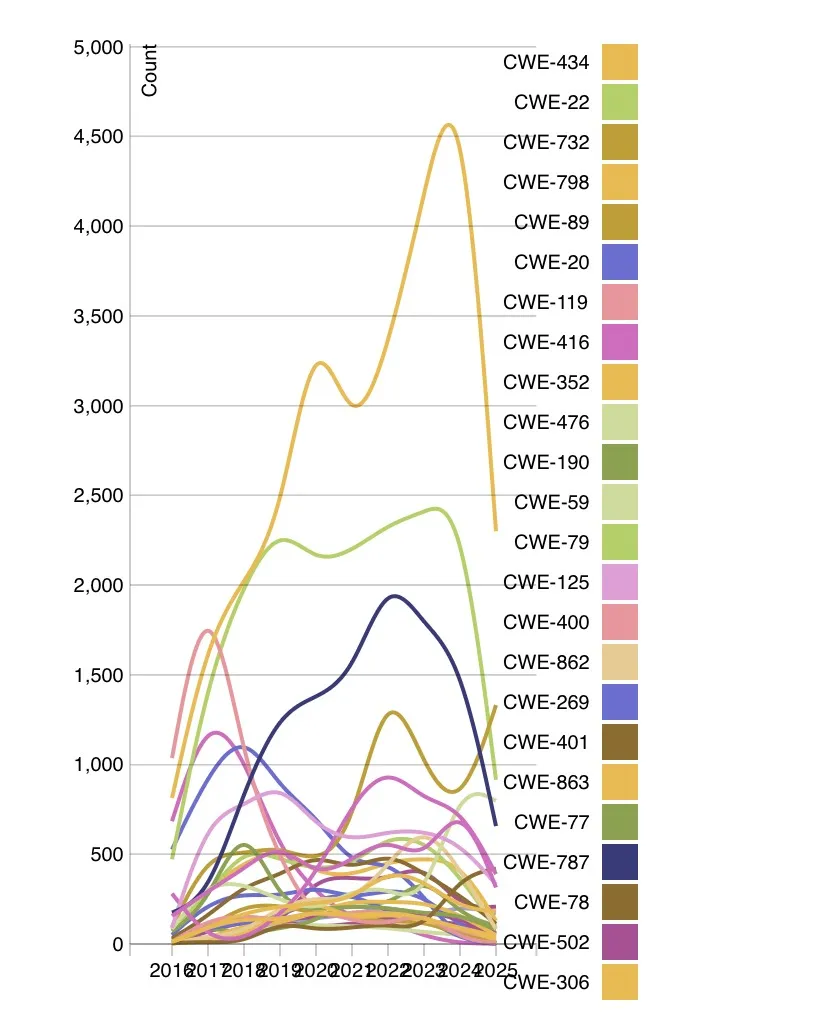
NIST’s National Vulnerability Database has public charts showing vulnerability patterns over time, including breakdowns by type, a reminder that new issues keep arriving whether you’re ready or not.
### What pen testing is good at
Instead of listing 300 possible weaknesses, a good pen test will show you a small number of examples of how one might penetrate your defenses.
For example, a tester can find a minor misconfiguration, use it to access a log, pull a token from that log, and then use the token to access a privileged API endpoint. None of those steps alone sounds catastrophic, but together, they’re a breach.
However, that doesn’t mean you can just run one pen test a year and be covered. The problem with that approach is that vulnerabilities don’t arrive once a year. They arrive all the time.
You could pass a pen test in March, and by April, have a new critical vulnerability drop in a common component you use. By May, this vulnerability is already being exploited in the wild.
That’s why most mature programs treat scanning as the continuous layer, and pen testing as the deep layer.
[NIST’s SP 800-115](https://nvlpubs.nist.gov/nistpubs/legacy/sp/nistspecialpublication800-115.pdf) is one of the clearer, widely referenced guides on security testing methods (including penetration testing). It’s written in a practical way and helps frame pen testing as a planned assessment, rather than a random “hacking stunt,” so I wholeheartedly recommend giving it a read.
### Where to start
Ask yourself what kind of uncertainty you have.
If you’ve never done a full inventory of what’s running on your servers, and you’re not sure if older libraries are still deployed, start with vulnerability scanning for fast visibility.
On the other hand, if you’re worried that someone could break in through the way your app works, prioritize a pen test.
The best combo is when the two efforts feed each other to prevent [the most dangerous cyber threats](https://eztalks.com/technology/most-dangerous-cyber-threats-impacting-businesses-today.html), instead of duplicating.
You can run scans regularly, then use scan trends to pick pen test focus areas. If scans keep finding insecure configurations in your cloud platform, that becomes a pen test theme. If your pen test finds a class of issue (like access-control mistakes), you add scanner rules and checks so those issues get caught sooner next time.
This is also where “scope discipline” comes into play. A pen test should focus on the parts of the system that matter most, like authentication, authorization, data access, admin workflows, and exposed services.
If you try to test everything equally, you get a report that looks thorough but doesn’t change outcomes.
### Hosting: where performance and security collide
In hosting, performance, and security literally share the same resources: CPU, memory, network, storage, and configuration.
The problem with this is that it means you could tighten security headers and WAF rules and accidentally block your own checkout flow. Or you could add heavy logging for compliance hosting solutions, and suddenly, disk I/O becomes a bottleneck.
This is why teams that run [cloud hosting](https://eztalks.com/cloud/comparing-used-hp-servers-vs-cloud-hosting-which-is-the-better-option-for-you.html) or manage dedicated servers benefit from testing that includes both the security layer and the “behavior under load” layer.
If your setup includes compliance hosting, you also have the documentation problem. You not only need to be secure, but you need to prove you’re managing risk consistently.
### Conclusion
Vulnerability scanning and pen testing are different tools for different jobs.
Scanning keeps you current against known issues, which is essential for web hosting companies and anyone running web hosting services at scale.
Pen testing shows you what a real attacker could do in your real environment, which is what you need when you’re building trust, shipping fast, and supporting customers on a cloud platform.
If you combine them with a simple cadence and tie findings to real fixes, you end up with fewer surprises, fewer emergency patches, and a system that stays steady even as threats and software change.
---
# Agent Instructions
This documentation is published with GitBook. GitBook is the documentation platform designed so that both humans and AI agents can read, navigate, and reason over technical content effectively. Learn more at gitbook.com.
## Querying This Documentation
If you need additional information that is not directly available in this page, you can query the documentation dynamically by asking a question.
Perform an HTTP GET request on the current page URL with the `ask` query parameter, and the optional `goal` query parameter:
```
GET https://eztalks.gitbook.io/blog/tech/vulnerability-scanning-vs.-pen-testing-what-you-need-for-consistent-performance-and-security.md?ask=&goal=
```
`ask` is the immediate question: it should be specific, self-contained, and written in natural language.
`goal` is optional and describes the broader end goal you are ultimately trying to accomplish on behalf of the user. GitBook uses it to tailor the answer towards what is most useful for that goal.
The response will contain a direct answer to the question and relevant excerpts and sources from the documentation.
Use this mechanism when the answer is not explicitly present in the current page, you need clarification or additional context, or you want to retrieve related documentation sections.