# Wistia Alternatives for Distance Learning Courses: An Educator's Buying Guide
Wistia gives course videos a sleek, on-brand player and granular engagement stats—exactly the polish we want for our lessons (a LearnDash analysis). But that polish gets pricey: according to Wistia's pricing page, the free tier caps you at 10 videos, and the Pro plan jumps to $79 per month before overages. If you manage dozens of lectures or need to lock down paid content, more affordable—and often more secure—options exist. This guide profiles five standout Wistia alternatives for 2026 and shows you how to choose. For an extended comparison, Spotlightr breaks down the “9 best Wistia alternatives” on its blog.
### Why look beyond Wistia for course video hosting?
#### 1. Price that escalates faster than enrollment
Wistia feels friendly at first: you can upload 10 videos for free. The moment you hit video 11, you must jump to the Pro tier at $79 per month, and every additional upload triggers an overage fee.
Most distance-learning teams outgrow the starter cap fast. One module might include six clips, a 12-week course can easily hit 50, and annual refresh cycles add another 20–30 files. When students binge material during finals, bandwidth spikes and the bill rises again.
What began as a modest line item can become one of the largest recurring costs in your tech stack, money that could fund instructional design or learner support instead. No wonder educators start asking: is there a smarter home for all these lessons?
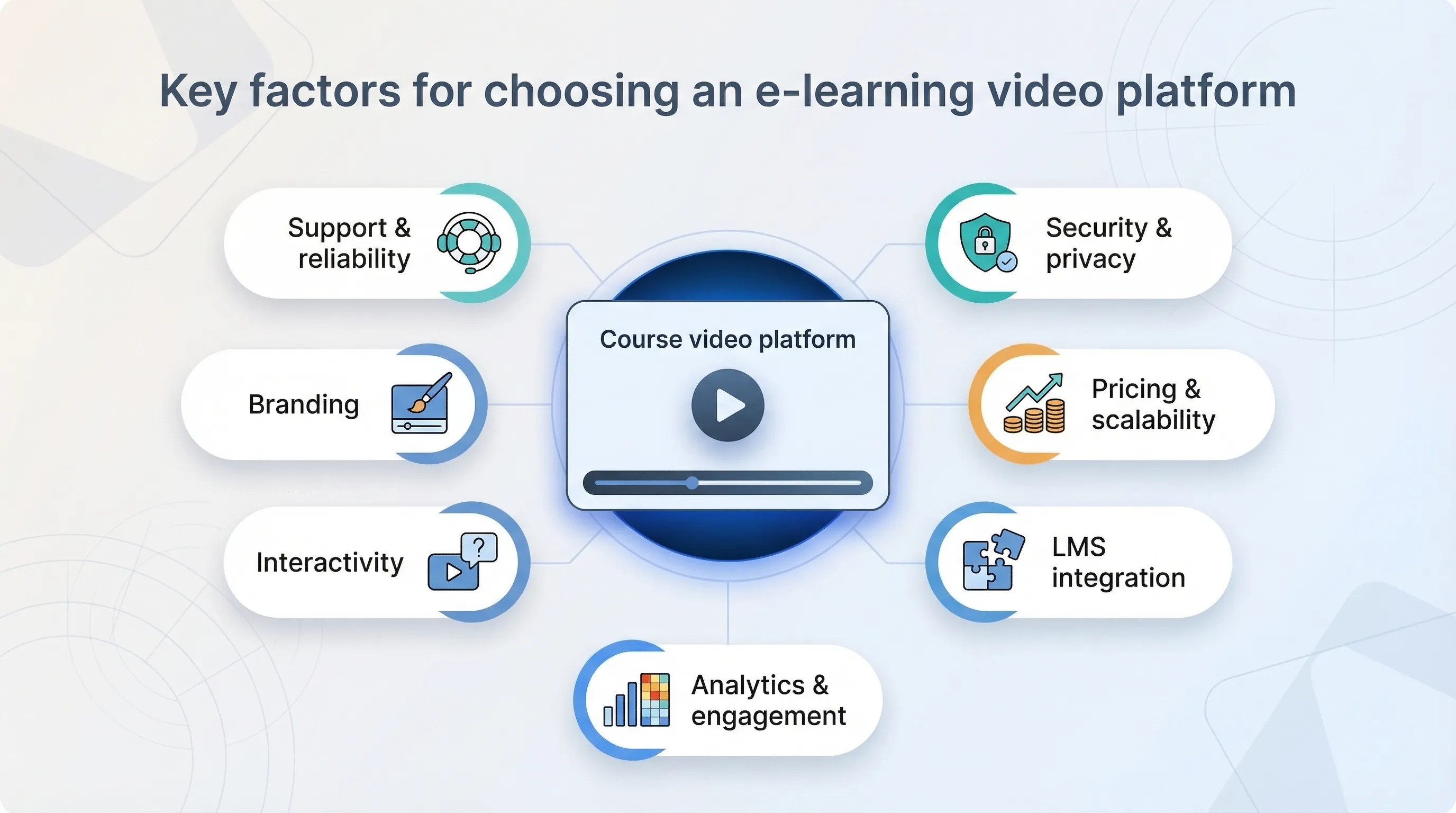
### Key factors for choosing an e-learning video platform
#### Security and privacy controls
Your course videos are intellectual property, not public-domain freebies, so choose a host that treats them that way.
Look for domain whitelisting, password gates, or single sign-on to keep casual link sharers out. For premium courses, combine encrypted streaming and dynamic watermarks that tag each playback with the viewer’s name or email, a quiet reminder that piracy leaves fingerprints.
Data privacy matters just as much. A reliable platform stores analytics responsibly, complies with regional rules such as GDPR, and lets you decide where files live. That flexibility protects learners who study from multiple countries and keeps legal teams calm.
Bottom line: if a service cannot guarantee that only enrolled learners see your lessons, while also protecting their data, move on.
#### Pricing structure and scalability
Video learning grows through iteration: extra walkthroughs, updated demos, new language tracks, and more. Your upload count will only rise.
Flat-rate plans keep that growth predictable. When a platform advertises “unlimited videos, five terabytes of monthly streaming,” you can sketch next year’s budget with confidence. By contrast, per-video or per-gigabyte fees create unwelcome surprises when a cohort binge-watches during finals week.
Watch for ceilings hidden inside starter tiers: low-cost plans that throttle HD playback, cap weekly uploads, or add bandwidth surcharges once viewership spikes. Those limits rarely match academic calendars and can stall momentum just as engagement peaks.
Also check upgrade paths. Can you add storage or bandwidth à la carte, or must you leap to an enterprise bundle packed with features you will never use? The best alternatives let you dial resources up or down each semester, the same way you adjust adjunct hours.
True scalability feels almost boring, which is exactly what you want. Finance sees a steady line item, and you focus on teaching rather than meter-watching.
#### LMS integration and ease of embedding
A beautiful player means little if it refuses to work with the rest of your stack.
Start with basics: does the platform generate clean iframe code you can drop into Canvas, Moodle, or a WordPress LMS without tracking down a special plug-in? Better yet, does it offer an LTI connector that passes watch data back to the gradebook? That single sign-on handshake spares students another login and shows you who finished the lecture before quiz day.
Upload workflow matters, too. Drag-and-drop batch imports, automatic captioning, and bulk replace tools shave hours off content refresh cycles. If IT must step in every time a video changes, the system will gather dust.
When technology fades into the background, students press play, progress ticks forward, and you keep teaching instead of troubleshooting embeds.
#### Analytics and engagement insights
Teaching without feedback feels like addressing an empty hall. Detailed analytics close that loop.
A solid platform shows more than total views; it maps where learners pause, rewind, or drop off. Those heat spots reveal confusing explanations long before course evaluations arrive.
Better still, some hosts tie data to individual logins. You open the gradebook, spot Maria at 42 percent completion, and send a friendly nudge before the midterm. That dashboard saves hours of manual tracking and lifts completion rates.
Seek tools that visualize cohorts over time, export CSVs for accreditation reports, and trigger LMS automations when a student finishes, or skips, a video. Insight matters only when it sparks action. When analytics work, weak segments get trimmed, strong moments become breakout clips, and every new cohort benefits from earlier refinements.
#### Interactivity and learning tools
Passive video suits documentaries; courses require participation.
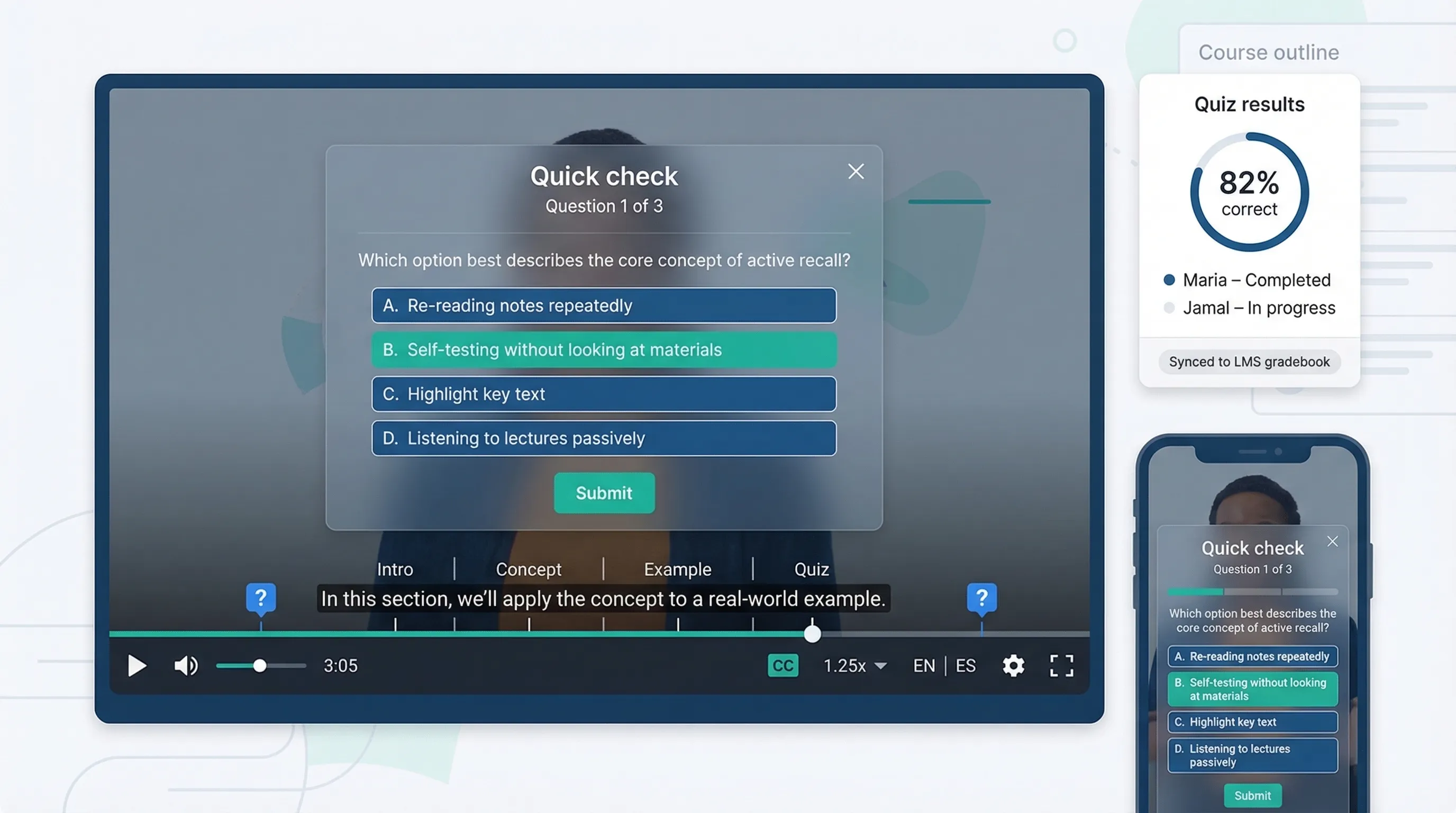
Platforms built for education embed quizzes, polls, and chapter markers directly in the timeline. A question at minute three pauses playback and prompts an answer, helping students commit ideas to memory. Completion rates climb, knowledge checks become automatic, and you gather fresh data without extra code. Some services even push quiz scores to the LMS, sparing you spreadsheet gymnastics.
Closed captions, multilingual tracks, and adjustable playback speed matter just as much. They welcome learners with hearing loss, non-native speakers, and busy professionals who study during a commute.
When you evaluate a host, upload a sample lesson, add two quiz prompts, and preview on mobile. If the workflow feels intuitive and the result looks seamless, you have found a tool that teaches alongside you rather than merely storing files.
#### Customization and branding
A cohesive visual identity signals professionalism and keeps learners focused.
Your video player should blend into the course page, picking up brand colors and typography without showing a third-party logo. Subtler tweaks count, too: choose whether the timeline shows chapter markers, hide the share button on paid programs, and select which controls remain visible on mobile.
Control over thumbnails and splash screens shapes expectations before a student presses play, and custom end screens can drive the next action, such as downloading a worksheet or joining the forum.
Think beyond appearance. A white-label player sidesteps institutional firewalls that block consumer sites, prevents competitors from piggy-backing on your content, and eliminates distracting suggested videos. If every element—from lesson title to playback control—feels purpose-built for your school, you boost credibility and keep attention where it belongs.
#### Support and reliability
Few things derail an online class faster than a spinning buffer icon or an unanswered support ticket.
Dependable hosts distribute content through a global CDN, serving HD streams to students in Manila as smoothly as those in Miami. They publish transparent uptime records, often 99.9 percent or better, and back claims with status dashboards you can check.
Human help matters just as much. Instructors work late nights and weekends; a chat widget that answers within minutes, or a clear knowledge base, keeps production on schedule and tempers pre-launch panic.
Study user reviews for patterns. Do they praise response speed? Do updates roll out without breaking existing embeds? Reliability may not be flashy, yet when a midterm video must play at 11 p.m., it becomes the feature you value most.
Choose a platform that treats downtime as unacceptable and customer questions as urgent. Your students, and your sanity, will thank you.
### Top Wistia alternatives for distance learning (2026 edition)
#### Spotlightr – built for educators
Spotlightr speaks the language of course creators. Its freshly updated [guide to the best Wistia alternatives](https://spotlightr.com/9-best-wistia-alternatives-for-video-hosting/) compares nine hosting platforms on price, security, and LMS integrations, giving educators a benchmark before they commit. Formerly vooPlayer, the platform centers on engagement and security without enterprise pricing.
You can drop quiz questions onto the timeline, gate progress until a learner answers, and watch results populate inside Spotlightr analytics. This single feature replaces the “video plus separate form” workflow many instructors still juggle.
Security is tight. Domain restriction keeps lessons on approved URLs, while dynamic watermarks stamp each viewer’s email on the video, a personal deterrent to piracy.
Cost stays manageable. The Starter plan is about $24 per month with unlimited uploads, and the Pro tier undercuts Wistia while adding extra bandwidth and privacy tools. Because there are no per-video surcharges, you can keep recording without mental math.
Pros: education-first features, granular security, flat pricing.
Cons: smaller user community, a learning curve on day one.
Spotlightr is ideal for paid or proprietary courses where interactivity and protection matter most.
#### Vimeo – the popular all-rounder
Vimeo is the dependable sedan of video hosting, unflashy yet capable.
A Plus or Pro plan removes ads, unlocks domain privacy, and provides a yearly upload allowance of 250 GB or more. Flat pricing lets you map an entire curriculum without second-guessing every file drop.
Playback quality impresses. Students on slow Wi-Fi appreciate adaptive streaming, while creatives enjoy 4K support. Embeds slide smoothly into WordPress, Canvas, and other LMS tools, so setup rarely needs IT.
Analytics cover heatmaps, completion rates, and viewer geography. If you need built-in quizzes, add-ons are required, yet many courses prefer the straightforward approach.
Vimeo suits programs seeking professional presentation, predictable cost, and near-universal compatibility.
#### SproutVideo – security first
SproutVideo rarely makes headlines, yet privacy-minded instructors swear by it.
The platform offers granular controls: login protection, IP whitelisting, and single sign-on for institutions with strict identity rules. Flip a switch and a video disappears everywhere except your LMS, a feature auditors love.
Unlimited uploads on the mid-tier plan keep costs clear, while bandwidth scales in generous blocks so notices arrive well before a bill spike. The player is fully brandable and supports calls to action that link directly to worksheets or next modules.
Trade-off: a utilitarian interface and no native quizzes. For confidentiality and predictable pricing, however, SproutVideo delivers exactly what it promises.
#### Panopto – enterprise academic suite
Panopto was born on campus, and it shows. Universities rely on it to capture multi-camera lectures, auto-index spoken words, and sync results to the LMS gradebook.
Its standout feature is search. Students type a phrase, and Panopto jumps to the exact slide where that term appears, an instant study aid. Built-in quizzes record scores alongside other assignments.
Security meets institution standards: single sign-on, role-based permissions, and optional on-premise storage. [Live webcasts](https://eztalks.com/webinars/advantages-and-disadvantages-of-webcasting.html) come included, turning the same tool into a home for guest lectures.
Pricing and complexity match its power. Panopto usually sells site licenses rather than creator-friendly monthly plans, and IT support is required.
Large schools or corporations wanting an all-in-one backbone will find Panopto hard to beat.
#### YouTube (unlisted) – the free baseline
When the budget is zero and a lesson must go live tonight, YouTube unlisted links deliver instant, global playback at no cost.
Upload, mark the video unlisted, embed in your course, and students can watch on any device. Adaptive streaming, auto-captions, and easy chapter markers ride along with the world’s largest video infrastructure.
The perks carry risks. Unlisted links spread quickly, and you cannot restrict embeds to your domain. Branding control is limited, and “related videos” can steal attention.
Analytics focus on broad audience trends, not individual progress. For paid or sensitive content, the security trade-off is often a deal-breaker.
Use YouTube for public MOOCs, teaser lessons, or urgent internal updates. Move to a purpose-built host when stakes rise.
#### Other noteworthy alternatives
* **Vidyard** – Ideal for creators who split time between marketing and teaching; personalized video messages and viewer-level heatmaps span both worlds.
* **Brightcove** – Fortune-500 reliability and global CDN reach suit commencement streams, though prices reflect the pedigree.
* **Cincopa** – Hosts video, audio, and images in one portal, helpful when courses mix lecture clips with slide decks and podcasts.
* **Dacast** – Built-in paywalls, coupons, and subscription bundles allow instructors to sell lessons without third-party carts.
* **Gumlet** and **Cloudflare Stream** – API-first pipelines with HLS encryption and domain-signed URLs; best for developer-led teams building custom learning apps.
#### Competitive snapshot: Wistia versus the leading alternatives
| Platform | Entry price | Limits | Stand-out edge | Primary drawback | Best fit |
| ----------- | ------------------------- | ---------------------------------------- | --------------------------------------------------- | ------------------------------------ | --------------------------------------------------------- |
| Wistia | Free (10 videos), Pro $79 | 10 free uploads, 1 TB per month on Pro | Polished branding, marketing analytics | Costs rise quickly as libraries grow | Marketers or micro-courses under 10 videos |
| Spotlightr | $24 Starter | Unlimited videos, tiered bandwidth | In-player quizzes plus watermark security | Smaller user community | Independent course creators protecting premium content |
| Vimeo | $12 Plus | 250 GB uploads per year on Plus | Ad-free, embeds everywhere | Limited interactivity on core plans | Budget-conscious programs needing reliable HD playback |
| SproutVideo | $25 Seed | Unlimited uploads, 500 GB bandwidth base | Granular privacy controls, SSO | Basic UI, no native quizzes | Corporate training or courses with strict confidentiality |
| Panopto | Institutional license | Unlimited within contract | Lecture capture, searchable transcripts, grade sync | Enterprise pricing and complexity | Universities and large learning departments |
### 2025–2026 trends every educator should track
Artificial intelligence still grabs headlines, yet the quiet story is how video platforms folded AI into daily teaching tasks.
Auto-captions now land within minutes and approach human accuracy in several languages. Wistia even introduced AI dubbing that matches lip movements, hinting at a future where you record once and reach global cohorts overnight. Watch which hosts push these tools to lower tiers; early adopters gain accessibility and worldwide reach without extra editing.
Interactive video shifted from “nice to have” to expected. Quizzes, polls, and clickable chapters no longer sit only in premium academic suites. Mid-market players such as Spotlightr and Vidyard raised the baseline, and students now look surprised when a lecture lacks mid-stream engagement. If your host offers no native interactivity, check its 2026 roadmap before renewal.
Security conversations sharpened after multiple content leaks. Institutions asked for clear data-residency choices and stronger digital rights management. That demand produced hybrid models: vendors let you store files in EU-only regions or sync encrypted copies to your own S3 bucket while still using their player. Expect bring-your-own-storage options to appear at signup.
The gap between LMS and video host continues to shrink. Canvas, Moodle, and WordPress plugins now ship with lightweight media clouds or one-click connectors, reducing the copy-paste chore. As these ecosystems mature, you may shift from “Which external host?” to “Does my LMS already cover eighty percent of my needs?”
Revisit requirements every year. A platform that feels perfect today may lag next semester if it stalls on AI captions, interactivity, or compliance updates.
### What fellow educators are saying
Scroll through any teaching forum and a few themes surface quickly.
* “Wistia’s great until your library grows.” Instructors praise crisp playback, then share screenshots of overage invoices. Their pain informs our focus on flat-rate alternatives.
* “I worry about students ripping videos.” Course sellers swap tips on watermarking and domain locks, noting that unlisted YouTube links leak faster than lecture notes. Their stories place security at the top of our checklist.
* “I need proof students watched the material.” Training managers post heatmaps and ask how to tie them to individual grades, which drives our emphasis on analytics that sync with the LMS.
* “I want quizzes inside the video, not on a separate page.” Solo creators celebrate platforms that embed questions mid-stream, keeping learners engaged and simplifying grading.
* “Support saved me at 2 a.m.” Whether through Vimeo’s forums or SproutVideo’s live chat, educators remember platforms that respond when deadlines loom, a reminder that fast help often beats flashy features.
These collective voices ground the guide in real classroom experience, ensuring the recommendations solve problems teachers face rather than those marketers imagine.
---
# Agent Instructions: Querying This Documentation
If you need additional information that is not directly available in this page, you can query the documentation dynamically by asking a question.
Perform an HTTP GET request on the current page URL with the `ask` query parameter:
```
GET https://eztalks.gitbook.io/blog/education/wistia-alternatives-for-distance-learning-courses-an-educators-buying-guide.md?ask=
```
The question should be specific, self-contained, and written in natural language.
The response will contain a direct answer to the question and relevant excerpts and sources from the documentation.
Use this mechanism when the answer is not explicitly present in the current page, you need clarification or additional context, or you want to retrieve related documentation sections.